If you've ever worked with authentication in a web application, you've almost certainly encountered JWT (JSON Web Token). It's used by countless APIs, mobile apps, and modern authentication systems.
But despite its popularity, there's a surprising amount of confusion around what a JWT actually contains.
Many developers assume a JWT is encrypted. Others believe it's a secure place to store passwords or sensitive user information. Some even think it's impossible to modify.
None of those are true.
In this article, we'll break down exactly what's inside a JWT, what isn't, how it works behind the scenes, and the security mistakes developers should avoid.
What Is a JWT?
A JSON Web Token (JWT) is a compact, URL-safe string used to securely transmit claims between two parties.
Instead of storing session data on the server, the server issues a signed token containing information about the authenticated user. The client stores this token and sends it back with future requests.
A typical JWT looks like this:
eyJhbGciOiJIUzI1NiIsInR5cCI6IkpXVCJ9
.
eyJ1c2VySWQiOjEyMywicm9sZSI6ImFkbWluIiwiZXhwIjoxNzM1Njg5NjAwfQ
.
SflKxwRJSMeKKF2QT4fwpMeJf36POk6yJV_adQssw5c
Notice the two dots (.). They separate the token into three distinct parts.
The Three Parts of a JWT
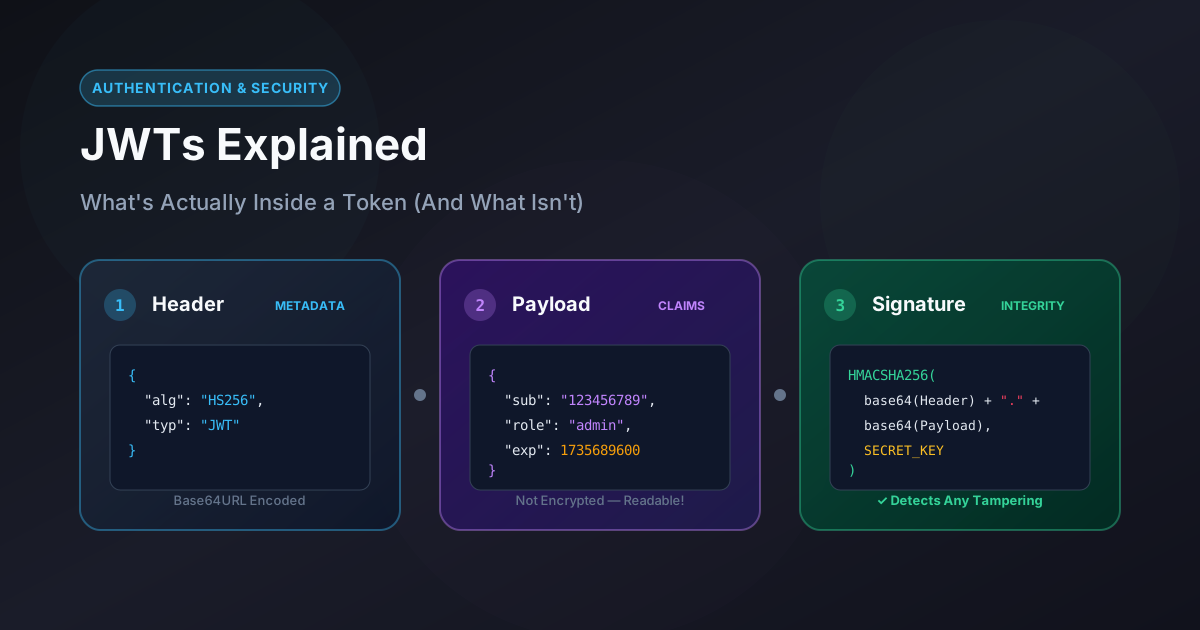
Every JWT contains:
Header.Payload.Signature
Each section is Base64URL encoded.
Let's explore each one.
Part 1: Header
The header contains metadata describing the token.
Example:
{
  "alg": "HS256",
  "typ": "JWT"
}
Typical fields include:
alg→ Signing algorithmtyp→ Token type (JWT)
This information tells the server how the token was signed.
After Base64URL encoding, it becomes something like:
eyJhbGciOiJIUzI1NiIsInR5cCI6IkpXVCJ9
This isn't encrypted—it is simply encoded.
Part 2: Payload
The payload contains claims.
Claims are pieces of information about the user or authentication event.
Example:
{
  "sub": "123456789",
  "name": "Alice",
  "role": "admin",
  "iat": 1735600000,
  "exp": 1735603600
}
Common JWT claims include:
| Claim | Meaning |
|---|---|
sub |
Subject (usually user ID) |
iss |
Issuer |
aud |
Audience |
iat |
Issued At |
exp |
Expiration Time |
nbf |
Not Before |
jti |
Token Identifier |
Applications can also include custom claims:
{
  "userId": 42,
  "plan": "premium",
  "role": "editor"
}
Again, this section is encoded, not encrypted.
Anyone who has the token can decode it in seconds.
Part 3: Signature
The signature is what gives JWTs their integrity.
The server computes something like:
HMACSHA256(
    Base64Url(header) + "." + Base64Url(payload),
    SECRET_KEY
)
The result becomes the third section of the token.
The server later recomputes this signature to verify:
The token wasn't modified
The token came from a trusted issuer
If even a single character in the payload changes, the signature becomes invalid.
To experiment with cryptographic digests and see how SHA-256 or HMAC signatures behave when input data changes, try our interactive Hash Generator:
Is JWT Encrypted?
This is the biggest misconception.
Standard JWTs are not encrypted.
They're only:
JSON
Base64URL encoded
Digitally signed
Encoding is not encryption.
For example:
eyJuYW1lIjoiQWxpY2UifQ
can easily be decoded back into:
{
  "name": "Alice"
}
This means anyone holding the token can read its contents.
If you want to quickly encode text or decode Base64 strings to verify how easily raw data is read, test it right in your browser using our Base64 Encoder / Decoder:
What Should NEVER Be Stored Inside a JWT?
Since JWT payloads are readable, never store:
❌ Passwords
❌ API keys
❌ Database connection strings
❌ Credit card information
❌ OTPs
❌ Secret tokens
❌ Refresh token secrets
❌ Personal information you wouldn't want exposed
A JWT should contain only information that is safe to expose if someone inspects the token.
What SHOULD Be Stored?
JWTs work best when storing lightweight identity information.
Good examples include:
User ID
Username
User role
Permissions
Organization ID
Subscription tier
Token expiration
Issued time
Keep the payload as small as possible.
Large JWTs increase request size because the token is sent with every authenticated API call.
Can Someone Modify a JWT?
Yes.
Anyone can modify:
Header
Payload
Because they're just Base64URL-encoded text.
However, after modification, the signature becomes invalid.
For example:
Original payload:
{
  "role": "user"
}
Modified payload:
{
  "role": "admin"
}
The attacker can create the modified token—but cannot generate a valid signature without the server's secret key (or private key, depending on the signing algorithm).
The server immediately rejects it.
How JWT Verification Works
When a request arrives:
The client sends the JWT.
The server splits it into three parts.
The server recomputes the signature.
The signatures are compared.
The expiration time is checked.
The issuer and audience are validated (if configured).
If everything matches, the request is authenticated.
If any check fails, access is denied.
JWT Does NOT Store Session State
Traditional authentication works like this:
Browser
    ↓
Session ID
    ↓
Server Session Store
The server remembers each logged-in user.
JWT authentication usually works differently:
Browser
    ↓
JWT
    ↓
Server verifies signature
No database lookup is required just to identify the user.
This makes JWTs ideal for:
REST APIs
Mobile applications
Microservices
Distributed systems
Common JWT Myths
Myth 1: JWT Is Encrypted
False.
It is encoded and signed.
Myth 2: JWT Cannot Be Read
False.
Anyone can decode the payload.
Myth 3: JWT Prevents Tampering Automatically
Partially true.
JWT detects tampering using the signature, but only if the server verifies it correctly.
Myth 4: Bigger JWT Means More Secure
False.
Large JWTs only increase bandwidth usage.
Myth 5: JWT Never Expires
False.
Well-designed JWTs include the exp claim and should have relatively short lifetimes.
Best Practices for Using JWTs
Always use HTTPS to prevent token interception.
Keep access tokens short-lived (for example, 15–60 minutes).
Store only non-sensitive claims in the payload.
Verify the token signature on every protected request.
Validate important claims such as
exp,iss, andaud.Use refresh tokens to obtain new access tokens instead of creating long-lived JWTs.
Rotate signing keys periodically where practical.
Never trust a decoded JWT without verifying its signature.
Decode a JWT Yourself
If you're curious about what a token contains, you can decode the first two sections manually.
The header and payload are simply Base64URL-encoded JSON. Instead of decoding each Base64 segment separately, you can paste any full JWT directly into our client-side JWT Decoder to instantly inspect its claims, header metadata, and expiration status right in your browser with 100% privacy:
You can also use our Base64 Encoder / Decoder if you want to inspect individual raw Base64 segments, or our Hash Generator to understand how cryptographic hashes and HMAC digests work alongside signing algorithms.
Remember: decoding a JWT does not verify its authenticity. Only the signature verification process using the correct secret or public key can prove that a token hasn't been altered.
Final Thoughts
JWTs are one of the most widely used authentication mechanisms in modern applications, but they're often misunderstood.
The key takeaway is simple:
The header describes the token.
The payload contains readable claims.
The signature protects the token from tampering.
A JWT is not encrypted, not secret, and not a secure place to store sensitive information. Its real strength lies in allowing servers to verify authenticity without maintaining session state, making it an efficient and scalable choice for APIs and distributed systems.
Once you understand what each part does—and, just as importantly, what it doesn't—you'll be able to design more secure authentication systems and avoid many of the common pitfalls developers encounter when working with JWTs.